

This post discusses how to customize the ZSH startup message displayed when opening a new terminal window. I recently synced my iTerm2 settings across my computer. I decided while tidying up my local development to update the ZSH startup message that appears on load to include a message and ASCII art.
[ASCII art] is the most universal computer art form in the world — every computer system capable of displaying multi-line text can display ASCII art, without needing to have a graphics mode or support a particular graphics file format. — ASCII Art Archive
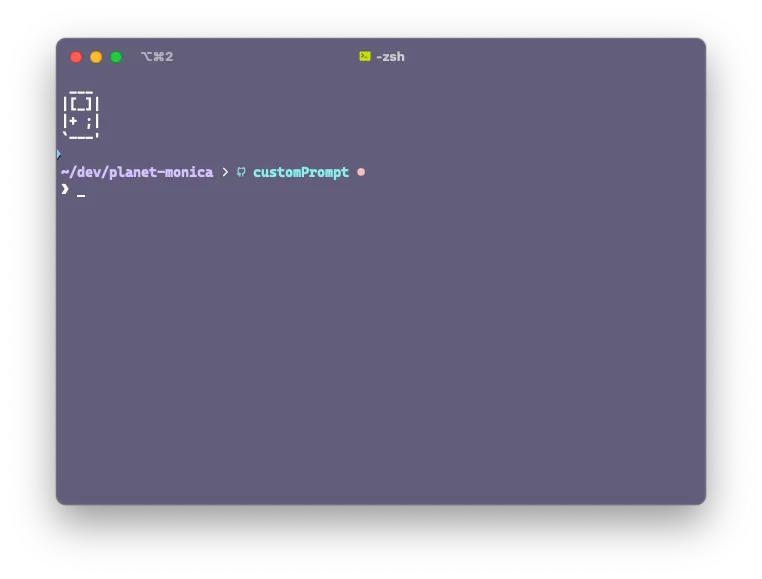
I browsed the ASCII Art Archive for inspiration from floppy disks to crowns to computers to abstract imagery and eventually settled on this GameBoy-inspired piece by Hayley Jane Wakenshaw.
 ___
|[_]|
|+ ;| hjw
`---'
Displaying Static Text in New ZSH Window
To display these characters when opening a new terminal window I needed to update my ~/.zshrc file (or include it in a file that my ~/.zshrc loads such as my ZSH theme file) to include the ASCII characters with each Line wrapped in double quotes preceded by the echo command.
 # ~/.zshrc OR your zsh theme file
 echo " ___"
 echo "|[_]|"
 echo "|+ ;| "
 echo "\`---'"
After updating my ~/.zsrhc I was able to verify the appearance of the text on start-up by running source ~/.zshrc within an existing terminal window or when opening a new window.
Using Variables with Prompt Text
In addition to printing out static information, one can also display different information depending on the value of a variable such as time. To determine the current hour one can use the following command:
date +"%H"
18 # output at 6PM
I decided based on the current hour to return a different greeting value by checking whether or not the current hour was -ge (greater than or equal to) or -le (less than or equal to) specific time ranges I defined.
# Get the current hour in 24-hour format
hour=$(date +"%H")

# Define time ranges
morning_start=5    # 5 AM
morning_end=11     # 11 AM
afternoon_start=12 # 12 PM
afternoon_end=17   # 5 PM


# Check the time of day and print a message
if [ "$hour" -ge "$morning_start" ] && [ "$hour" -le "$morning_end" ]; then
    greeting="Good morning"
elif [ "$hour" -ge "$afternoon_start" ] && [ "$hour" -le "$afternoon_end" ]; then
    greeting="Good afternoon"
else
    greeting="Good evening"
fi

 echo " ___"
 echo "|[_]|"
 echo "|+ ;|  ✦ $greeting, Monica! ✦" # string interpolation
 echo "\`---'"
The above script in my ~/.zshrc outputs a welcome prompt that appears like the below image:
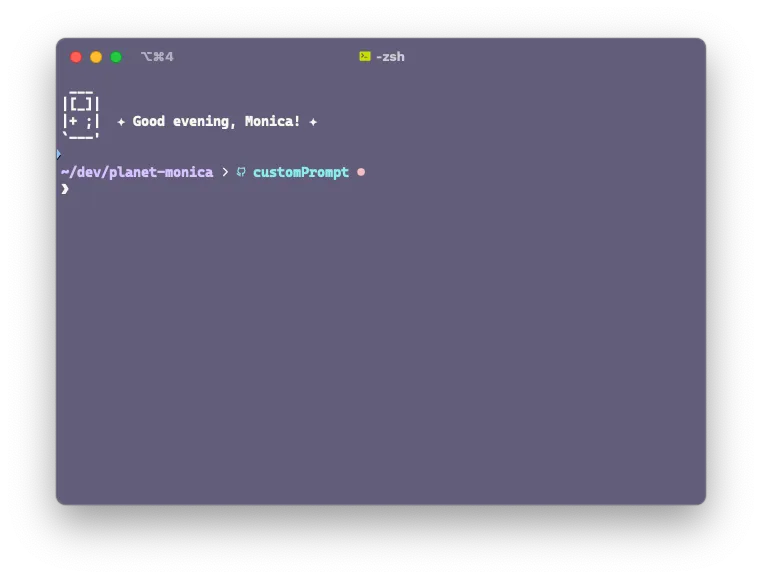
The exact output that is displayed is one of the following messages depending on the time of day:
- ✦ Good morning, Monica! ✦
- ✦ Good afternoon, Monica! ✦
- ✦ Good evening, Monica! ✦
In summary, you can update your ~/.zshrc with echo to print out messages that only appear when source ~/.zshrc is initially run or a new terminal window is opened. In addition to always displaying the same welcome message, it can be updated based on various variables such as system values like the current time.
The full script for my oh-my-zsh theme, including the welcome message described in this article, is viewable in my dotfiles on GitHub.
 Follow @monica.dev