

This article shows you how to customize your VSCode set up to display animated sparkles while you are typing. There’s a VSCode extension, Power Mode that adds animated flair while you’re typing. It has a few different default animations but none of them quite sparkle. If you’re not using VSCode, check out these Power Mode extensions for various code editors. The implementation of each differ but some of them support customized animations.
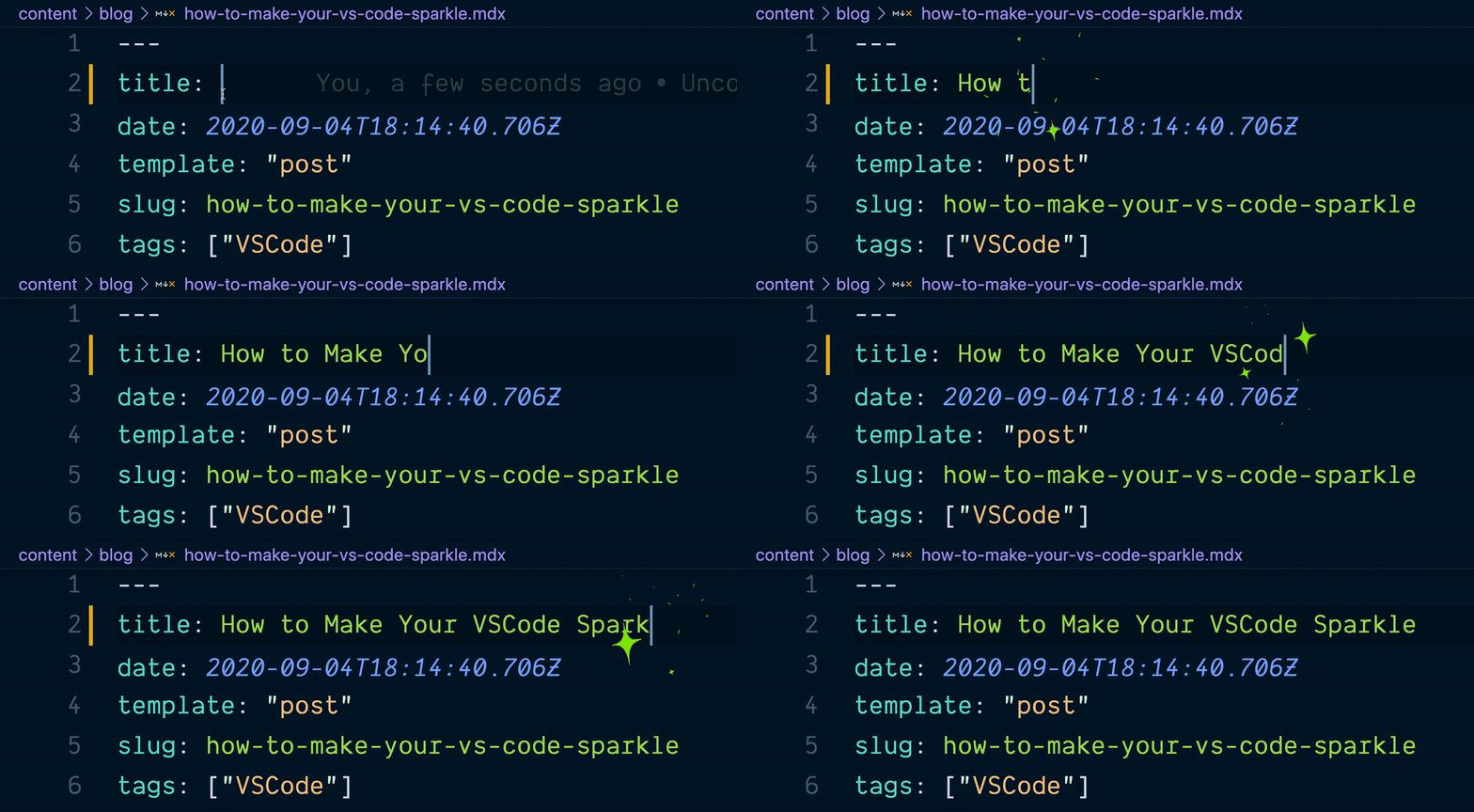
Above is a GIF of animated sparkles in my VSCode. The editor’s theme is Night Owl and the font is Dank Mono. You can learn more about my VSCode setup on my uses page.
Enable Power Mode Extension for VS Code Typing Animation
In order to add animations to your VSCode first you need to install Power Mode and enable it by updating your VSCode settings to include the following:
"powermode.enabled": true.
Depending on your operation system the VSCode settings file is located here:
Windows - %APPDATA%\Code\User\settings.jsonmacOS - $HOME/Library/Application Support/Code/User/settings.jsonLinux - $HOME/.config/Code/User/settings.json
Customize How Power Mode Renders Animations
"powermode.enabled" turns on the extension’s default animations when you’re typing but if you want sparkles then some additional customization is required.
In particular, you need to configure "powermode.customExplosions" in settings and pass in your own animation to be used for the explosions. This setting supports base64 encoded gifs, absolute file path, or https image URLs.
 "powermode.customExplosions": [
// absolute path to custom ✨ GIF on my computer
    "/Users/monica/Dev/power-mode-sparkles/sparkles.gif"
  ],
If you are interested in other animation ideas aside from sparkles check out the vscode-power-mode/Help wanted: explosion gifs issue on GitHub. In fact, this issue is where I found the image for my sparkles ✨ thanks to federicca. You can Download the Sparkle GIF I used for my configuration.
My Final Power Mode VSCode Configuration
My VSCode settings.json includes the following keys and values after configuring Power Mode:
// turn on powermode 🚨
"powermode.enabled": true,
  "powermode.customExplosions": [
// absolute path to custom ✨ GIF on my computer
    "/Users/monica/Dev/power-mode-sparkles/sparkles.gif"
  ],
  // enableShake is true by default which causes the
  // text/screen to shake, the following line disables that
   "powermode.enableShake": false,
  // tweaking settings to reduce amount of explosions
  "powermode.maxExplosions": 1,
  "powermode.explosionFrequency": 4,
  //backgroundMode mask - animation matches the current syntax color
  //backgroundMode image - displays animation with original colors from the image
  "powermode.backgroundMode": "mask",
Optimizing Power Mode
Power Mode recommends tweaking some of the default settings to reduce the frequency of animations if the extension is causing your editor to slow down.
Sparkle GIF to Download
Right-click and save this image to your computer if you’re ready to start adding more sparkles to your development workflow.

 Follow @monica.dev


 What's this?











in Bookmarks from September and October
Also this gif has now followed me to three or four different machines now because SPARKLES: aboutmonica.com/blog/how-to-...
I hereby decree all code gifs in tweets must contain powermode / sparkles. aboutmonica.com/blog/how-to-ma… h/t @indigitalcolor
Heh, I knew about “Power Mode” extensions before. Used Atom back then but they are basically available for most code editors by now. What I didn’t know is that they can load basically any sprite. Learn here how to make #vscode sparkle: https://www.aboutmonica.com/blog/how-to-make-your-vs-code-spark... Read more
The 1st question asked at each hackathon workshop I give is how I made my VSCode sparkle--time to bookmark this blog post by @indigitalcolor bc I reference it so much! aboutmonica.com/blog/how-to-ma…
aboutmonica.com/blog/how-to-ma… Things nobody asked for, but we're happy that they exist. The most sparkly POCs in the land!
How to Make Your VSCode Sparkle | monica*dev - aboutmonica.com/blog/how-to-ma…
How to Make Your VSCode Sparkle | monica*dev - aboutmonica.com/blog/how-to-ma…
How to Make Your VSCode Sparkle | monica*dev - aboutmonica.com/blog/how-to-ma…
How to Make Your VSCode Sparkle | monica*dev - aboutmonica.com/blog/how-to-ma…
How to Make Your VSCode Sparkle | monica*dev - aboutmonica.com/blog/how-to-ma…
How to Make Your VSCode Sparkle | monica*dev - aboutmonica.com/blog/how-to-ma…
this is a real thing, wow aboutmonica.com/blog/how-to-ma…
Sometimes your code just needs a bit of sparkle! Thanks for the tutorial @waterproofheart 🤓✨. aboutmonica.com/blog/how-to-ma…
VSCodeを輝かせる方法!w How to Make Your VSCode Sparkle aboutmonica.com/blog/how-to-ma…
Learn how to customize your VScode setup to display animated sparkles while you're typing! ✨ Thanks @waterproofheart for sharing! aboutmonica.com/blog/how-to-ma…
Hoy le puse estrellitas a mi IDE ✨ y quedó super mágico 😍
Sparkly✨
✨This guide helps you sparkle up your VS Code.
Thank you so much for this, Monica. It’s fabulous and I love it! ✨
Thanks Monica, I set it up on my VS code and I love it!!
✨ I only use VS Code for a few things, mostly template/HTML related, but this article literally sparks joy. ✨ aboutmonica.com/blog/how-to-ma…
✨✨✨✨✨ Écrire du code qui brille (littéralement) sous VSCode, le tuto:
Looking forward to try ❤️🎉
I accomplished two good things today - got my website into an almost presentable state, and followed this tutorial so that my code now sparkles as I write it. Heck yeah!
The other devs at work our going to get sick of me from Monday. I'm going to use every excuse possible to pair program so they can see this in my editor 😂😂😂
✨ Couldn't help myself 🥺✨ https://t.co/7mwp4yy5mg
Live footage of me dropping what I'm supposed to be doing to follow @waterproofheart's tutorial 💖✨: https://t.co/t4aWNCrTN0
Reminder: this is awesome ✨
aboutmonica.com/blog/how-to-ma…
Add some 90 website feeling to your favorite code editor 😅 aboutmonica.com/blog/how-to-ma…
aboutmonica.com/blog/how-to-ma…
I need this! ✨✨✨
🤩
@waterproofheart aboutmonica.com/blog/how-to-ma… this is just awesome 😍
aboutmonica.com/blog/how-to-ma…
Recommended Read: How to Make Your VSCode Sparkle aboutmonica.com/blog/how-to-ma… #devopsish
VSCode literally outshines other IDEs
🤩
omg how cute! on my to-do list 👀
I am going to give this a try
This looks appealing. Got to try it. Thanks for sharing....
oh no... this is so much fun!! 😂😂
with great power comes great responsibility 😆
Ver depois
Haha. I’m glad it sorted out.
Wow... I tried and tried and instantly after sending this tweet... it worked with the other extension! Of course... 🤦♀️
It's so cool! 💖 But it seems to break my bracket pair colorizer extension 😭
@shangniwho
I need that for my editor 😍 twitter.com/waterproofhear…
aboutmonica.com/blog/how-to-ma…
Calling @aaronbassett!
@Tomastrg 👀
Después de llevar un rato picando código... https://t.co/XFLTb866Xv
Well ain't that just 🌌🌟✨🌠
My kind of thing!
I need this ✨👇
A lo mejor así lloro menos cuando estoy programando xD
Pero esta maravilla! ✨
Cómo brillar
Make your code pretty ✨🤩
Make no mistake, developing has been always cool. This is just... awesomeness...
need this! i will make it so! ✨
Well clearly I need to set this up
Live footage of me dropping what I'm supposed to be doing to follow @waterproofheart's tutorial 💖✨: https://t.co/t4aWNCrTN0
Imma need to try this. I mean, I barely wrote code anymore so might as well make the times I do be all sparkly and shit.
Coollll
The nyan cat progress bar is one of the plugins I miss from IntelliJ. I went down the plugin rabbit hole looking for a VS Code equivalent to Key Promoter plugins.jetbrains.com/plugin/9792-ke…
✨ Couldn't help myself 🥺✨ https://t.co/7mwp4yy5mg
I love when folks make tech pretty ✨ + I too will code from now on with sparkles 🙆🏾♀️
✨ magic sparkles make everything 1000x better ✨
I haven't!
Phillip, let's figure it out in JetBrains! @trisha_gee, we too, would like to sparkle
@parandea1_7 for some reason this reminded me of you
What’s that template were you are writing, is that for a blog post or something?
This is _soooo cool_ wow - super jealous I use JetBrains now
How to Make Your VSCode Sparkle✨✨ Thanks, @waterproofheart for sharing this ✨✨article. aboutmonica.com/blog/how-to-ma…
The video alt is Monica typing in her VSCode editor and there are sparkles around where she typed!
I want that :)
Omg I love this!
The other devs at work our going to get sick of me from Monday. I'm going to use every excuse possible to pair program so they can see this in my editor 😂😂😂
Thank you Prince!
How do you always make so much amazing things 🤩
This is like Disney Princess IDE and I want it
I...love this so intensely and it is brightening the hell out of my day.
Magic 👏🏻